iOS Through the Years: Every Version, Every Era
19 major versions. One continuous story of how Apple shaped the way a billion people interact with a screen.
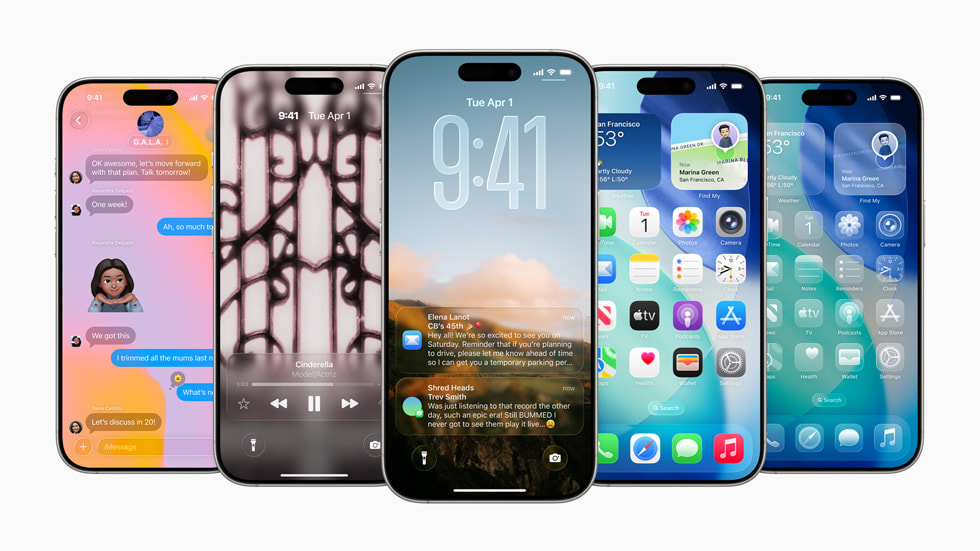
iOS 27
Siri 2.0 & The Intelligence Layer Rumored — Sept 2026
September 2026 · "The Snow Leopard release"
Note: iOS 27 has not been announced yet — WWDC 2026 is June 8. Everything below is based on leaks from Bloomberg's Mark Gurman, MacRumors, 9to5Mac, and Apple backend code found in April–May 2026. Details may change at announcement.
iPhone 12 and later (rumored) · Apple Intelligence requires iPhone 15 Pro or later
—🤖 Siri 2.0 — dedicated Siri app with conversation history, chatbot-like interface, and Dynamic Island integration
—✍️ "Write with Siri" — AI writing assistant embedded deeper into the OS with Help Me Write and grammar checking
—📷 Live Visual Intelligence — camera scans nutrition labels, contact cards, QR codes, and addresses in real time
—🖼️ Photos AI toolkit — Extend, Enhance, and Reframe join Clean Up in a new "Apple Intelligence Tools" section
—🎟️ Apple Wallet "Create a Pass" — scan any QR code or build passes from scratch; store custom tickets digitally
—📸 Customizable Camera app — users choose which controls appear: flash, timer, exposure, depth, resolution, styles
—🔁 Home Screen undo & redo — reverse accidental icon/widget moves from the long-press menu
—🪟 Liquid Glass refinements — transparency slider added; iOS 26's design polished but not redesigned
—📡 Expanded satellite support — Maps integration, third-party API, and 5G NTN for iPhone 18 Pro
—📱 iPhone Fold multitasking — two apps side-by-side on the inner display; iPadOS-like split-screen for foldable
—🌐 Safari auto tab group names — AI-generated names for tab groups based on content
—⚡ Under-the-hood performance pass — faster, lighter, less battery drain — Apple's "Snow Leopard moment"
UI/UX take
iOS 27 is shaping up as a maturity release rather than a showstopper — the "Snow Leopard" of iPhone software. After iOS 26's bold visual gamble with Liquid Glass, Apple appears to be focusing inward: finishing what was promised, fixing what shipped rough, and quietly making AI feel less like a demo. The real headline is Siri 2.0 — if it actually delivers context-aware, conversational assistance, it would be the first time Siri genuinely competes with Google Assistant or ChatGPT. The camera customization and Wallet pass builder are the kind of unsexy-but-daily-useful features that quietly become indispensable. For designers, the Liquid Glass transparency slider signals Apple is listening to the pushback — a rare public course correction.
iOS 26 — September 2025
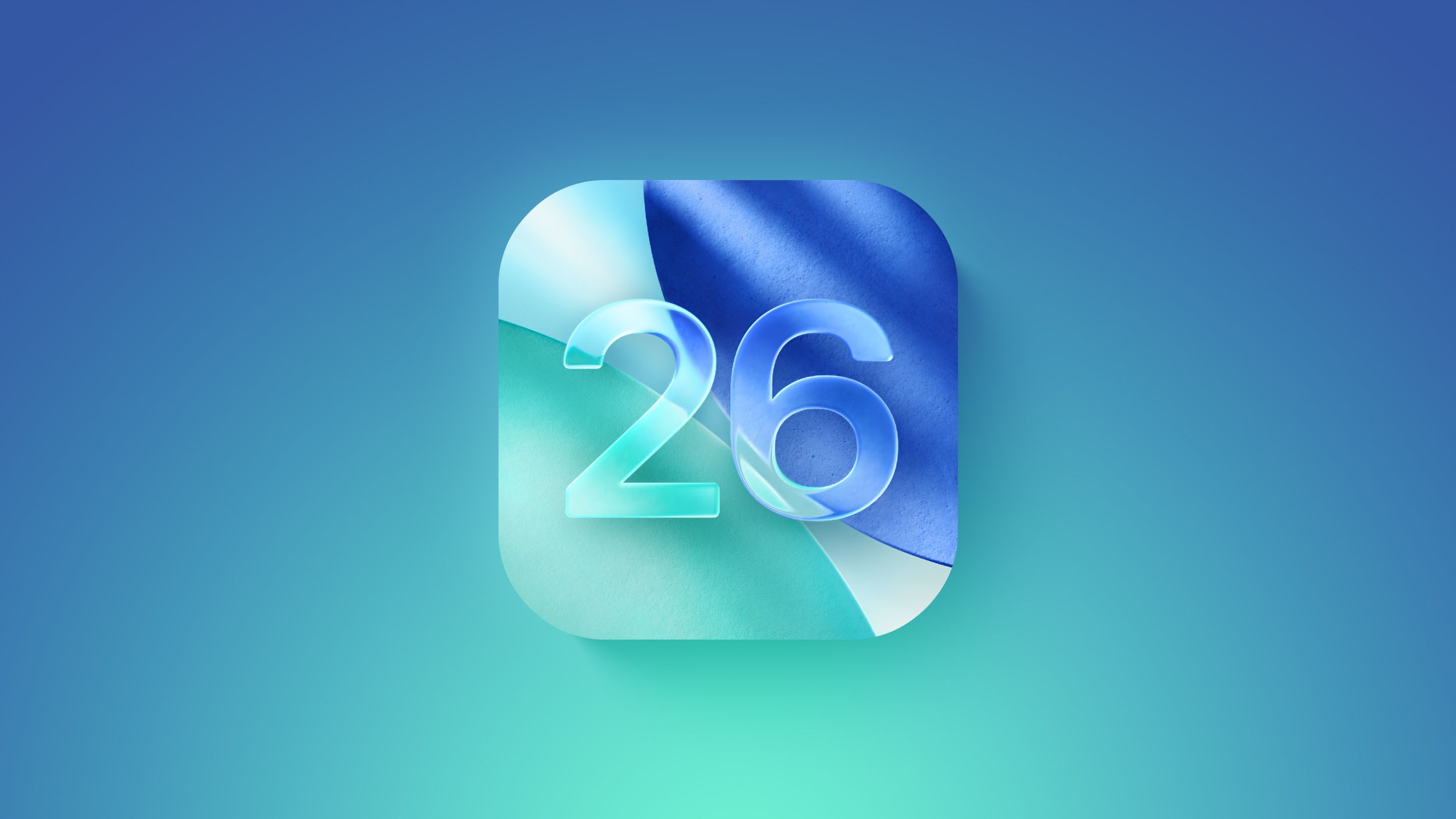
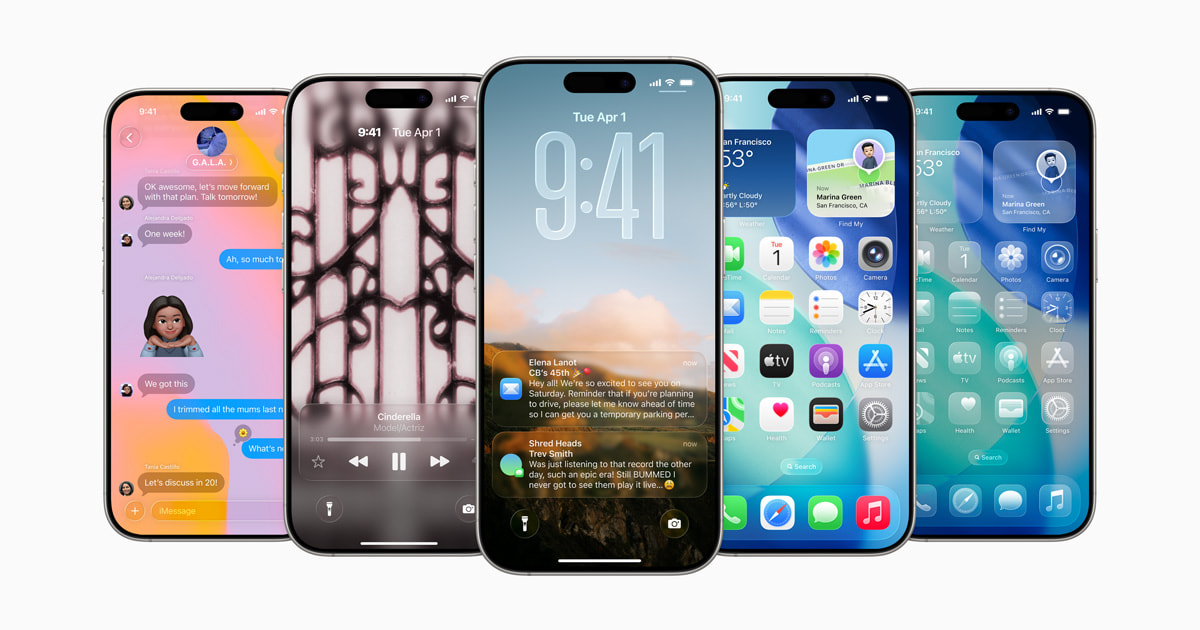

"Liquid Glass — A New Era" ⭐ Biggest Redesign Since iOS 7
Devices: iPhone 11, 12, 13, 14, 15, 16 series, SE (3rd gen)
Features
🪟 Liquid Glass design language — translucent, layered, reflective surfaces across the OS
📞 Call Screening & Live Translations in Phone app
🎮 Games app replaces Game Center
💬 Custom backgrounds, polls, and typing indicators in Messages
🔋 Adaptive Power mode for smart energy saving
Quantum-secure TLS 1.3
Full per-contact call history
Braille Access built in
UI/UX Take The most ambitious visual overhaul since iOS 7. Liquid Glass introduces depth and translucency across every surface — inspired by visionOS's spatial design. The result feels immersive and futuristic, but also jarring for longtime flat UI users. Initial adoption was slower than usual, driven partly by the divisive aesthetic. Apple is betting spatial UI is the future of screens, even before everyone has spatial devices.
iOS 18 — September 2024
"AI Meets Deep Customization"
Devices: iPhone XS, XR, and all newer models through iPhone 16 series, SE (3rd gen)
Features
🤖 Apple Intelligence — AI writing tools, Genmoji, Image Playground, Clean Up in Photos
🏠 Free icon placement on Home Screen — no grid lock
🔒 Lock and hide apps with Face ID or passcode
🔧 Fully customizable Control Center with multiple pages
🔑 Passwords app — standalone password manager
Satellite messaging support (iPhone 14+)
RCS support in Messages
UI/UX Take The last iOS with flat design. Free icon placement broke the rigid grid after 17 years — finally. Apple Intelligence rolled out gradually and felt unfinished at launch, but showed a clear direction: AI woven into every interaction. The visual language stayed familiar while the intelligence layer underneath quietly changed everything.
iOS 17 — September 2023
"Personal Touches"
Devices: iPhone XS and newer through iPhone 15 series, SE (3rd gen)
Features
📱 StandBy mode — ambient smart display when charging horizontally
📞 Contact Posters — custom caller identity cards
✅ Check In — auto-notify a contact when you arrive safely
Live Voicemail with real-time transcription
Autocorrect overhaul — finally learns your habits
NameDrop to share contacts by proximity
Journal app
UI/UX Take StandBy turned the iPhone into a bedside smart display with no extra hardware — a clever use of idle screen real estate. Contact Posters added identity and personality to incoming calls. The autocorrect improvements were quietly one of the most welcomed changes in years, ending years of embarrassing auto-corrections.
iOS 16 — September 2022
"Lock Screen, Reinvented"
Devices: iPhone 8 and newer through iPhone 14 series, SE (3rd gen)
Features
🎨 Lock Screen customization — fonts, colors, widgets, depth effects
✏️ Edit & Undo Send in Messages
🛡️ Safety Check for emergency privacy reset
📋 Live Activities on lock screen
iCloud Shared Photo Library
Crash Detection (iPhone 14)
Passkeys — passwordless login standard
UI/UX Take The lock screen overhaul was long overdue. The depth effect — where the subject of your wallpaper pops in front of the clock — was a showstopper. Live Activities brought real-time info to the lock screen non-intrusively. Passkeys quietly began Apple's push toward a passwordless future.
iOS 15 — September 2021
"Connected & Focused"
Devices: iPhone 6s and newer through iPhone 13 series, SE (2nd gen)
Features
🔔 Focus Modes — contextual notification filtering by context
📹 FaceTime SharePlay + spatial audio
📸 Live Text — interact with text in any photo
Mail Privacy Protection
Maps with immersive city experiences
Notification summary
UI/UX Take Focus Modes were thoughtfully designed — giving users real agency over when they're interrupted. Live Text was one of those "why didn't this exist before?" moments that felt instantly indispensable. Privacy continued to be a first-class design consideration, not an afterthought.
iOS 14 — September 2020
"The Home Screen Revolution"
Devices: iPhone 6s and newer through iPhone 12 series, SE (2nd gen)
Features
📊 Widgets on Home Screen — multiple sizes, fully customizable
📁 App Library — automatic, organized app drawer
🎯 App Clips — use app features without installing
Picture-in-Picture video
Compact call UI — no more full-screen call takeover
Default browser and email app support
UI/UX Take The biggest Home Screen update since 2007. Widgets arrived years after Android had them — but Apple's implementation was polished and well-integrated. App Library auto-organized the mess that comes with hundreds of apps. The compact call UI was a subtle but brilliant quality-of-life fix that users immediately loved.
iOS 13 — September 2019
"Dark Mode & Privacy First"
Devices: iPhone 6s and newer through iPhone 11 series, SE (1st gen)
Features
🌑 Dark Mode — system-wide dark theme
🔐 Sign in with Apple
✏️ Swipe keyboard (QuickPath)
Improved Maps with Look Around
Enhanced photo editing tools
iPad becomes iPadOS (its own separate OS)
UI/UX Take Dark Mode was possibly the most requested iOS feature ever — and Apple nailed it. Sign in with Apple was a privacy-respecting login standard that challenged Google and Facebook's data-hungry SSO. The iPad split into iPadOS, a smart acknowledgment of diverging use cases between phone and tablet.
iOS 12 — September 2018
"Performance Over Features"
Devices: iPhone 5s and newer through iPhone XS, XR
Features
⚡ Dramatic speed boost on older devices
📊 Screen Time — app usage tracking and limits
🔔 Grouped notifications
🤳 Memoji — personalized animated avatars
Siri Shortcuts (via Workflow acquisition)
FaceTime group calls up to 32 people
UI/UX Take Apple said "performance is a feature" — and delivered. Older iPhones felt fast again. Screen Time introduced behavioral design into the OS itself, encouraging mindful usage. Grouped notifications finally cleaned up years of lock screen chaos.
iOS 11 — September 2017
"iPad Grows Up"
Devices: iPhone 5s and newer through iPhone 8, iPhone X
Features
🗂️ Files app — real file management on iOS
Drag and Drop on iPad
Redesigned App Store
QR code scanner built into Camera
Redesigned, customizable Control Center
ARKit — augmented reality platform for developers
Do Not Disturb while driving
UI/UX Take The Files app was long overdue — iOS finally acknowledged it needed a file system. ARKit opened an entirely new interaction paradigm. The iPad gained a dock, multitasking panels, and drag-and-drop that made it feel like a real computer. Control Center was powerful but dense and non-obvious.
iOS 10 — September 2016
"Lock Screen Gets a Life"
Devices: iPhone 5 and newer through iPhone 7 series, SE (1st gen)
Features
💬 iMessage apps — stickers, effects, third-party mini-apps
Interactive rich notifications
Raise to Wake
Press Home to unlock (replaced slide-to-unlock)
🏠 Home app for smart home control
Ability to delete stock Apple apps
UI/UX Take iMessage transformed from SMS into a platform within a platform. Deleting stock apps was a small but symbolically huge move — Apple admitting not everyone needs every default. The lock screen felt alive and interactive for the first time.
iOS 9 — September 2015
"Smarter & Leaner"
Devices: iPhone 4S and newer through iPhone 6s series, SE (1st gen)
Features
🔋 Low Power Mode
🌙 Night Shift (blue light filter)
Proactive Siri suggestions
iPad Split View multitasking
News app
Optimized for 16GB devices
UI/UX Take Apple prioritized performance and battery over flashy new features. Proactive Siri was an early attempt at contextual, time-aware suggestions. Night Shift planted the seed for what would eventually become Dark Mode years later.
iOS 8 — September 2014
"Openness & Extensions"
Devices: iPhone 4S and newer through iPhone 6, iPhone 6 Plus
Features
🧩 Extensions — share sheets, custom keyboards, Notification Center widgets
Group messaging and voice messages in iMessage
Continuity & Handoff between iPhone and Mac
HealthKit and HomeKit frameworks
Touch ID open to third-party apps
UI/UX Take iOS 8 opened the OS to developers in meaningful ways. Custom keyboards (SwiftKey, Swype) finally arrived. Handoff was an early glimpse of Apple's ecosystem as a seamless whole — start on iPhone, finish on Mac.
iOS 7 — September 2013
"Flat is the New Leather" ⭐ Biggest Redesign in iOS History (until iOS 26)
Devices: iPhone 4 and newer through iPhone 5s, 5c
Features
🎨 Complete visual redesign — flat UI, thin fonts, new icon set
Control Center (swipe up from bottom)
AirDrop for wireless file sharing
FaceTime Audio
iTunes Radio
Background app refresh
Parallax motion effects on home screen
UI/UX Take Jony Ive's vision: out with skeuomorphism, in with clarity and translucency. The redesign was polarizing — some loved the freshness, others found it cold and hard to read. Regardless, it set the visual direction for the next decade. The parallax motion caused motion sickness for some users, leading Apple to introduce a Reduce Motion toggle.
iOS 6 — September 2012
"The Brave Swap"
Devices: iPhone 3GS and newer through iPhone 5
Features
🗺️ Apple Maps replaces Google Maps
Turn-by-turn navigation
🎟️ Passbook (proto-Wallet)
FaceTime over cellular
Do Not Disturb mode
UI/UX Take Apple Maps launched embarrassingly incomplete and became a PR disaster — Tim Cook even issued a public apology. But the ambition was right: owning navigation was strategically essential. Passbook was quietly visionary, becoming the foundation for Apple Pay and the Wallet we know today.
iOS 5 — October 2011
"Smarter, Wireless, Vocal"
Devices: iPhone 3GS and newer through iPhone 4S
Features
🎙️ Siri — voice assistant debuts on iPhone 4S
☁️ iCloud — wireless sync and backup
💬 iMessage — free messaging between Apple devices
Notification Center (pull-down shade)
Over-the-air updates (no iTunes required)
UI/UX Take Siri introduced conversational UI to the mainstream. iMessage silently began Apple's ecosystem lock-in strategy. Notification Center replaced the chaotic badge-only system with a pull-down shade — Apple borrowed the idea from Android and executed it cleanly.
iOS 4 — June 2010
"More Than a Phone"
Devices: iPhone 3GS, iPhone 4
Features
📱 Multitasking — switch between running apps
📁 Folders — organize apps into groups
📞 FaceTime video calling
Retina Display support
OS renamed from "iPhone OS" to iOS
UI/UX Take Multitasking and folders were huge quality-of-life wins. The Retina Display made every pixel matter — designers suddenly had to think at 2× resolution. FaceTime redefined what a phone call could look and feel like.
iPhone OS 3 — June 2009
"The Missing Basics"
Devices: iPhone (1st gen), iPhone 3G, iPhone 3GS
Features
✂️ Copy & paste (finally!)
MMS messaging
Spotlight search
Voice Memos app
In-app purchases
UI/UX Take Copy/paste was so overdue it became a cultural meme. This update filled obvious gaps users had been complaining about since day one. Spotlight Search gave users a way to navigate growing libraries of content — an early signal that the OS needed information architecture, not just icons.
iPhone OS 2 — July 2008
"The Platform is Born"
Devices: iPhone (1st gen), iPhone 3G
Features
🏪 App Store — third-party apps arrive, everything changes
Microsoft Exchange support for enterprise users
Push email and contacts
Maps with GPS support
UI/UX Take iPhone OS 2 turned a phone into a platform. The App Store's grid of icons became a design paradigm that influenced every smartphone that followed. Simple, browsable, tappable — and the beginning of an economy worth trillions.
iPhone OS 1 — June 2007
"The Beginning"
Devices: Original iPhone (1st gen)
Features
Multi-touch home screen with app icons
Core apps: Phone, Safari, Mail, Maps, iPod
On-screen keyboard
Visual voicemail
No App Store, no copy/paste, no third-party apps
UI/UX Take Revolutionary. The entire concept of "tap a glass screen to do things" was brand new. Skeuomorphic design made unfamiliar interactions feel familiar — a notepad looked like a notepad, a calculator looked like a calculator. It was teaching design at its finest.
Design Era Timeline
2007 – 2012   Skeuomorphic   Textures, shadows, realism — teaching metaphors
2013 – 2023   Flat           Clean, minimal, colorful — clarity wins
2024          AI Layer        Intelligent, adaptive — invisible smarts
2025 –        Liquid Glass    Translucent, spatial, layered — depth returns
Every Version at a Glance
Version | Year | Min Device | Headline |
|---|---|---|---|
iOS 26 | 2025 | iPhone 11 | Liquid Glass redesign |
iOS 18 | 2024 | iPhone XS | Apple Intelligence + free icon layout |
iOS 17 | 2023 | iPhone XS | StandBy, Contact Posters |
iOS 16 | 2022 | iPhone 8 | Lock Screen customization |
iOS 15 | 2021 | iPhone 6s | Focus Modes, Live Text |
iOS 14 | 2020 | iPhone 6s | Widgets, App Library |
iOS 13 | 2019 | iPhone 6s | Dark Mode, Sign in with Apple |
iOS 12 | 2018 | iPhone 5s | Performance, Screen Time |
iOS 11 | 2017 | iPhone 5s | Files app, ARKit |
iOS 10 | 2016 | iPhone 5 | iMessage apps, Home app |
iOS 9 | 2015 | iPhone 4S | Low Power Mode, Night Shift |
iOS 8 | 2014 | iPhone 4S | Extensions, Continuity |
iOS 7 | 2013 | iPhone 4 | Flat redesign |
iOS 6 | 2012 | iPhone 3GS | Apple Maps, Passbook |
iOS 5 | 2011 | iPhone 3GS | Siri, iCloud, iMessage |
iOS 4 | 2010 | iPhone 3GS | Multitasking, FaceTime |
iPhone OS 3 | 2009 | iPhone (1st gen) | Copy/paste, MMS |
iPhone OS 2 | 2008 | iPhone (1st gen) | App Store |
iPhone OS 1 | 2007 | iPhone (1st gen) | The beginning |
Sources: Apple, Wikipedia, Macworld